
100% Local-First AI Code Reviewer. Ship better code.

Review teammate PRs, resolve feedback in your PRs with 1-click verified fixes and catch bugs before you push — powered by the Claude Code, Cursor, Codex or Copilot you already use. Your code never touches our servers.

Download for macOS · Apple SiliconOpen source soon

Includes a ready-to-test demo project — install, open, and see it in action.

Live1,000+ Code Reviews CompletedmacOS · Windows · Linux
CodeCrab - 100% local-first AI pull request reviewer | Product Hunt

Works with

Bring your own AI subscription or keys
GitHubClaude CodeJiraGitLabCursorCodexCopilot CLIBitbucketSoon

Built for Privacy, Speed, and Engineering Control

One desktop app for every step of a pull request. From the first review request to the final push — five connected workspaces, all running locally.

Pull Request Code Review

Understand any PR faster, investigate bugs, and submit with confidence. Rich context first, AI findings pinned to the exact diff line, deep investigation to understand every bug, and GitHub review actions without leaving the app.

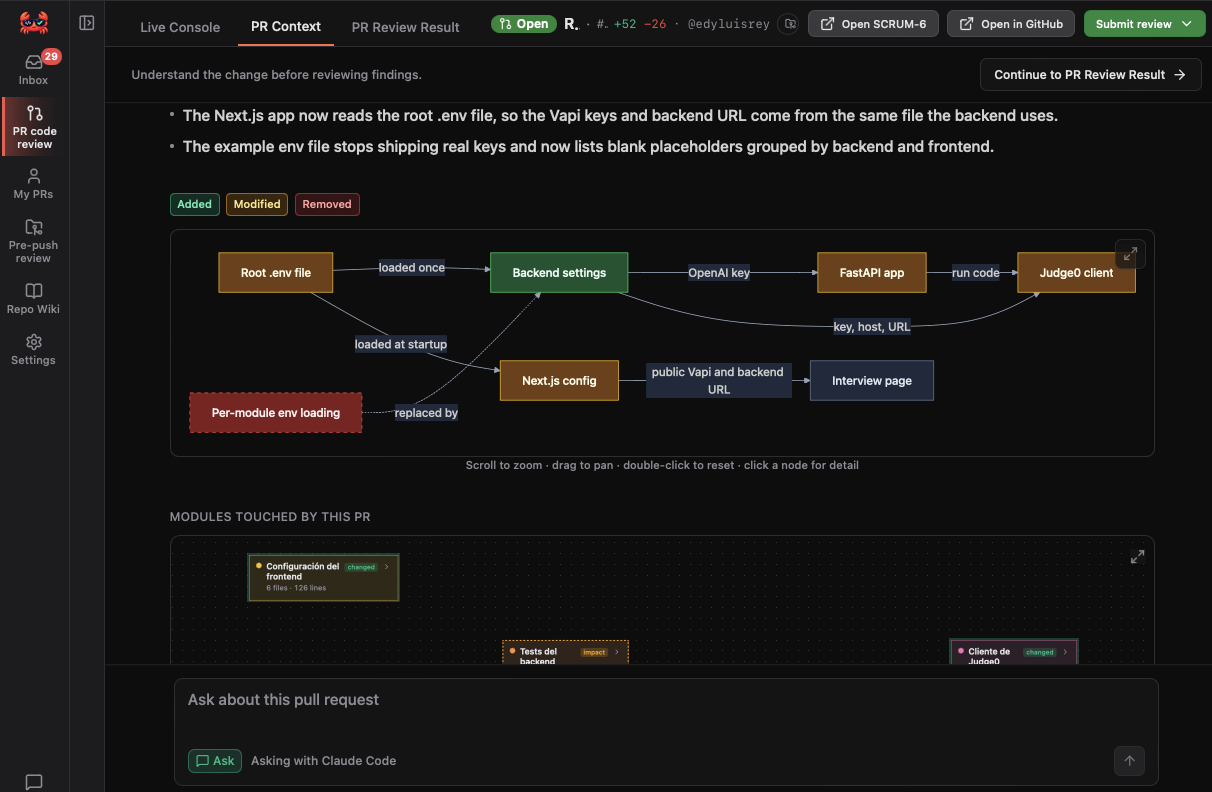
Rich PR Context & change graph

A tweet-length summary, scope bullets, diagrams and an interactive graph of how changed files connect — so you know what changed and why before reading a single line.

Learn more
Rich PR Context & change graph

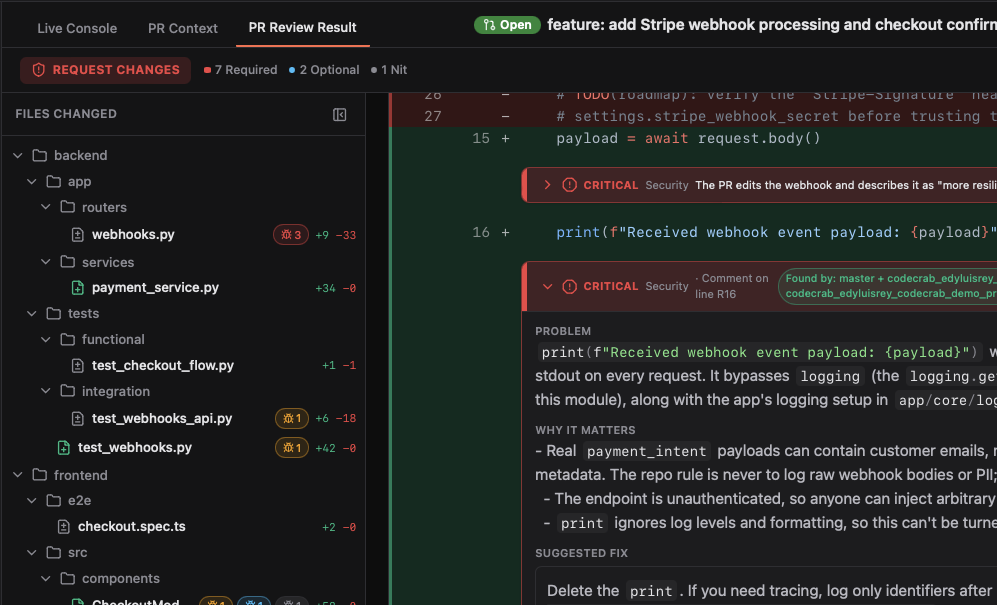
Verify AI code review results

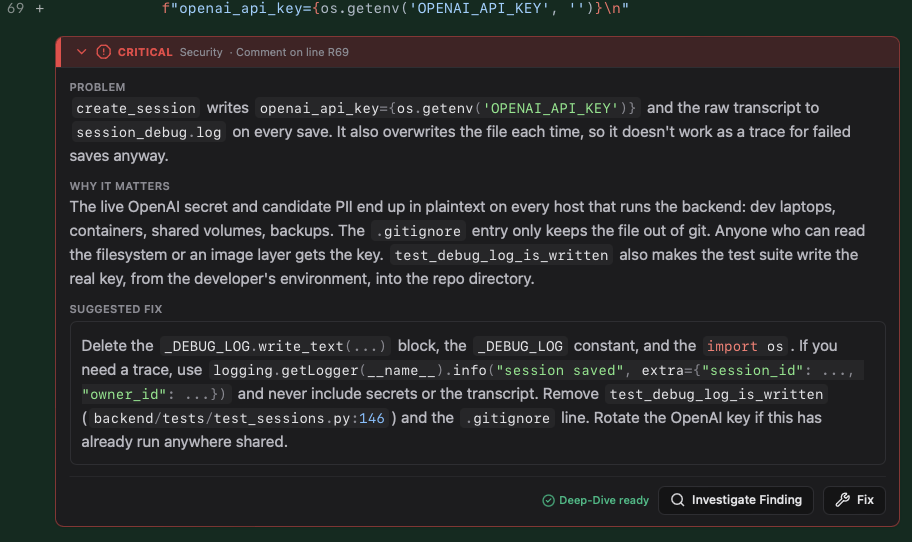
Catches logic bugs right on the diff, ranked Critical, Required, Optional and Nit — each with the problem, why it matters and a suggested fix. Deep-Dive runs locally against your repo in an isolated read-only copy to confirm every finding.

Learn more
Verify AI code review results

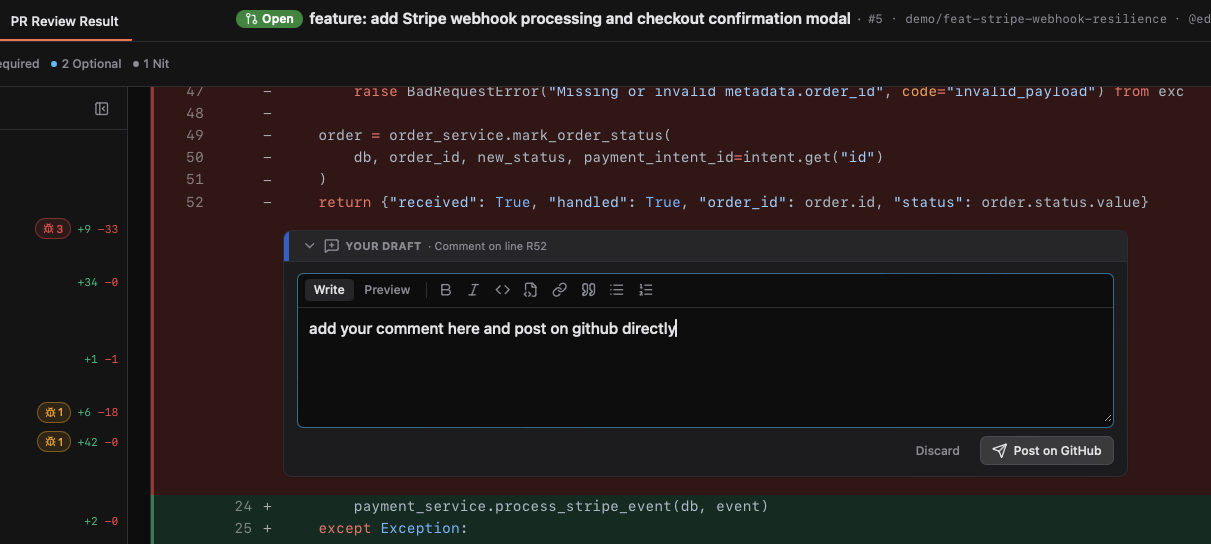
Post, comment & submit on GitHub

Post findings, add your own line comments, then Approve or Request changes directly from the app.

Learn more
Post, comment & submit on GitHub

My PRs — Feedback to Fix

Turn reviewer feedback into verified commits. Understand every comment, fix it with one click, test it locally — you approve every change, then reply and push.

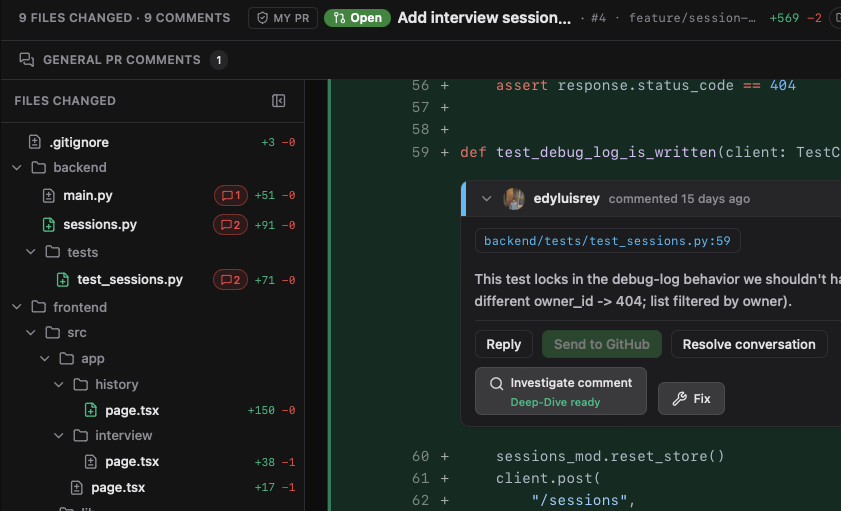
Investigate comments

Your agent explains what the reviewer is asking, why it matters and how to resolve it — read-only, nothing changes until you decide.

Learn more
Investigate comments

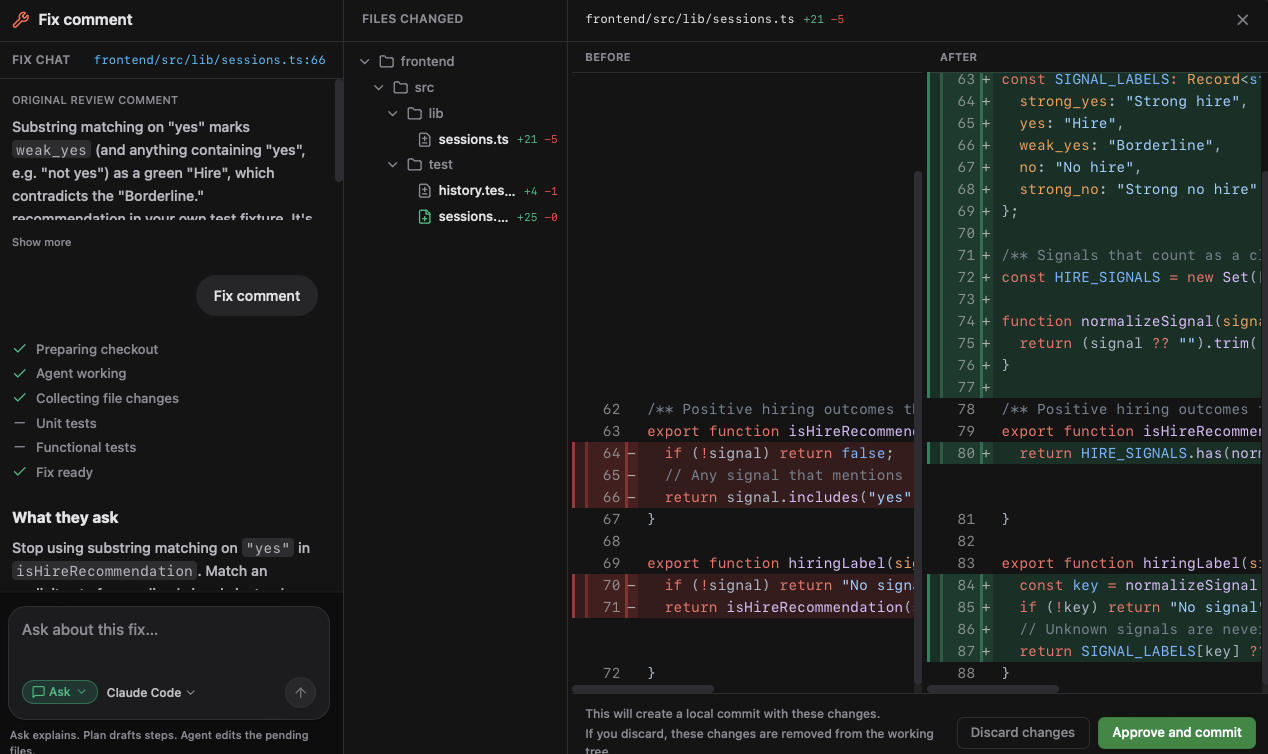
1-click Fix with preview diff

Checks your local branch before fixing, edits only what is needed, and shows before/after diffs for your approval.

  • Verified with your local setup: runs your tests, functional checks and linters before you accept anything.
  • Fix chat, reply & push: Ask, Plan or Agent follow-ups; approve a local commit, send the reply, resolve, then push — never force.
Learn more
1-click Fix with preview diff

Pre-push Review — Catch bugs before the PR

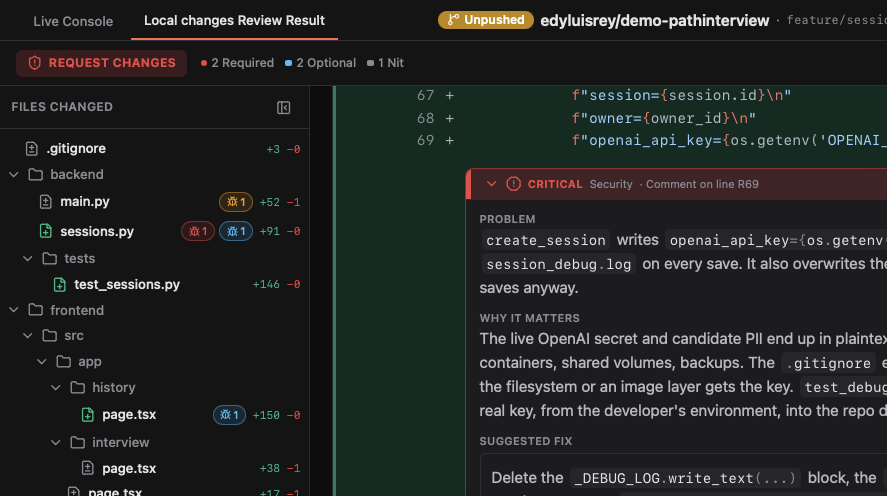
Review your local changes before you open a Pull Request. CodeCrab checks what you're working on — even across worktrees and parallel agent sessions — finds bugs early, and helps you fix them, so your PR passes review the first time.

Review local changes, before the PR

Reviews staged, unstaged and work-in-progress changes using only your local git — no GitHub needed.

  • Every repo, every worktree: each checkout and linked worktree gets its own card — ideal for parallel agent sessions.
  • Outdated detection: changed code after a review? CodeCrab flags it so you re-run before pushing.
See how the pre-push review works
Review local changes, before the PR

Investigate & 1-click fix

Understand each bug fast, preview the exact diff, then keep or discard the fix.

  • Stack fixes: apply several fixes and commit only when you're ready.
  • You stay in control: nothing is committed or pushed without your approval.
Code review checklist for AI-generated code
Investigate & 1-click fix

Built around your workflow

Three more tools that make CodeCrab part of your day: one inbox for all your work, a living wiki of your code, and skills you can extend your way — all running on your laptop.

Inbox — Know what needs you, across every repo

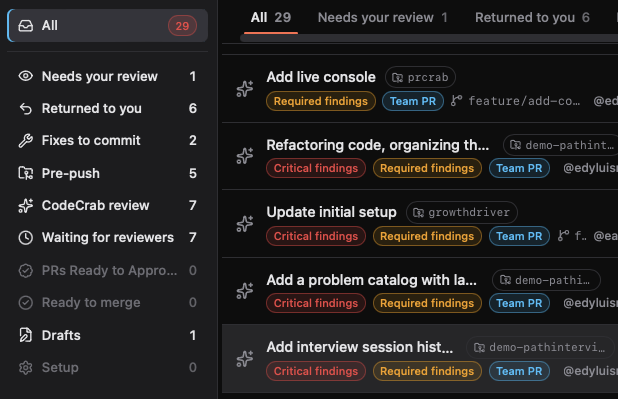
One feed for reviews, returned PRs, pending fixes and pre-push work.

  • All repos in one feed
  • Smart sections: Needs review, Returned, Fixes to commit…
  • One click to the right workspace
  • Snooze what can wait and focus
Explore Inbox
CodeCrab Inbox: sidebar of review queues with counters and a list of pull requests with finding badges

Repo Wiki — A living map of your codebase

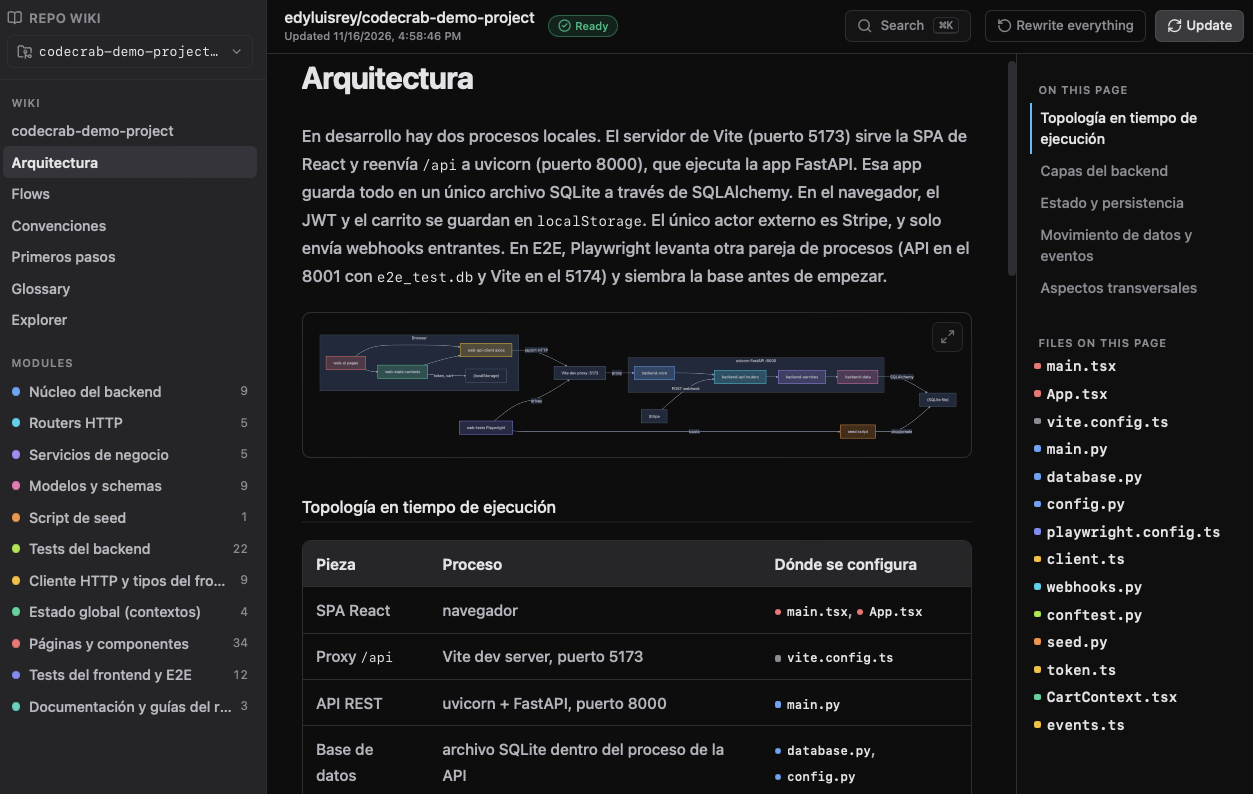
Onboard in hours, not weeks. Generated from your real code, on your laptop.

  • Architecture, flows & conventions
  • Interactive module map
  • Code explorer by module
  • Ask the wiki (read-only)
Explore Repo Wiki
CodeCrab Repo Wiki: architecture page with runtime topology diagram and module navigation

Your skills, your rules — Extend it your way

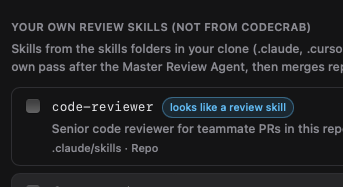
CodeCrab learns each repo's rules and works with the skills, agents and tools you already use.

  • Learns each repo into a review profile
  • Bring your own skills (Claude Code, Cursor, Codex, Copilot)
  • Mix your skills with CodeCrab agents
  • Works with Jira and your local setup
Create your own skill
CodeCrab skills panel: your own review skills from the skills folders in your clone, with a review-skill badge

Absolute Privacy & Security

100% On-Device Architecture

  • Zero-Code Uploads: Zero SaaS intermediary: CodeCrab never stores, proxies or uploads your code to its own servers or external databases.
  • Compliance-Ready: Works in strict corporate environments—no code is uploaded to CodeCrab servers. It stays local or goes directly to the AI provider you already approved.

Engineering Speed & Productivity

High-Impact Review Workflow

  • Early Bug Detection: Catches logic flaws, security risks, and regressions directly on your diff.
  • 1-Click Local Fixes: Generates verified code patches ready to apply directly to your local branch.

Total Control & Zero Risk

You Are in Full Control

  • Read-Only by Default: Never commits, pushes, or posts public GitHub comments without your explicit permission.
  • Local Test Verification: Runs your native test suite (cargo test, pytest, npm test) before applying changes.

Economic Efficiency & Token Reuse

Reuse What You Already Pay For

  • Reuse Existing Subscriptions: Connect directly to the tools and subscriptions you already pay for (Claude Code, Cursor).
  • Full Model & Cost Control: Choose which AI models to run and control exactly how much you spend on code reviews.

Native & Fluid User Experience

Desktop-First Performance

  • Instant & Lightweight: Blazing-fast native desktop performance, minimal RAM consumption, and instant startup.
  • Precision Diff Navigation: Clear changed-file tracking, inline observation badges, and clean multi-file diff inspection.

Local Integration & Extensibility

Plug & Play: Amplify Your Engineering Skills

  • Adaptive Codebase Profiles: Learns each repository's unique rules and patterns to build a custom review profile tuned specifically to your project.
  • Limitless Customization: Plugs into your existing Claude Code, Cursor, and local custom skills—allowing experienced engineers to enforce their own standards without replacing their workflow.

CodeCrab vs. cloud review bots

The difference isn't the model — it's where your source code ends up.

Capability / FeatureCodeCrab (Local-First)Cloud SaaS Bots
Code Privacy & SecurityNever leaves your machine (100% Client-Side)Uploaded & processed on vendor cloud servers
GitHub PermissionsYour own CLI login (gh)Requires org-wide OAuth admin permissions
Execution TransparencyLive Execution Console (real-time stdout/stderr)Opaque "black box" cloud pipeline
Tool OrchestrationUses your local Claude Code & Cursor setupsLocked to vendor's fixed model wrappers
Local VerificationExecutes your local test suite (pytest, npm test)Cannot run or verify local test suites
Performance & SpeedInstant local app native executionQueued background cloud runners
Why cloud review bots fail private codebasesCursor Bugbot vs Codex vs Claude CodeHow to use Cursor for code reviewGitHub Copilot code reviewGitLab AI merge request reviewCodeCrab vs CodeRabbit: the local-first alternativeCan Claude Code review PRs? Step-by-step guide

FAQ

Frequently asked questions

Where does my code go during a review?

CodeCrab runs on your computer and reads your repositories locally. Your code is never uploaded to CodeCrab servers. The AI CLI you choose (Claude Code, Codex, Cursor or Copilot) sends the relevant code to its own provider, under your account, keys and data terms. With a local model, nothing leaves your machine.

Which AI tools and models does CodeCrab support?

CodeCrab orchestrates Claude Code, Codex, Cursor and GitHub Copilot CLI, and works with GitHub and GitLab. You choose the model and bring your own AI subscription or API keys.

Can I review my code before opening a Pull Request?

Yes. Pre-push review analyzes your local, uncommitted or unpushed changes so you can find and fix bugs before anyone sees the diff.

How does CodeCrab help with feedback on my PRs?

In My PRs, CodeCrab investigates every reviewer comment against the surrounding code, explains what it really means and helps you apply the right fix on your local branch.

Do I need my own AI subscription or API keys?

Yes. CodeCrab uses the AI subscription or keys you already have (BYOK), so you stay in control of which provider and model reviews your code.

Can I try CodeCrab without connecting my repositories?

Yes. The app includes a ready-to-test demo project, so you can install it, open it and see a full AI code review without connecting your own code.

Supercharge your engineering workflow today.

Free Public Beta — Runs 100% on your machine. No code leaving your laptop

Includes a ready-to-test demo project — install, open, and see it in action.