
07 / Core workflow
Review a teammate’s PR
Set the top switch to PR code review and choose the repository.
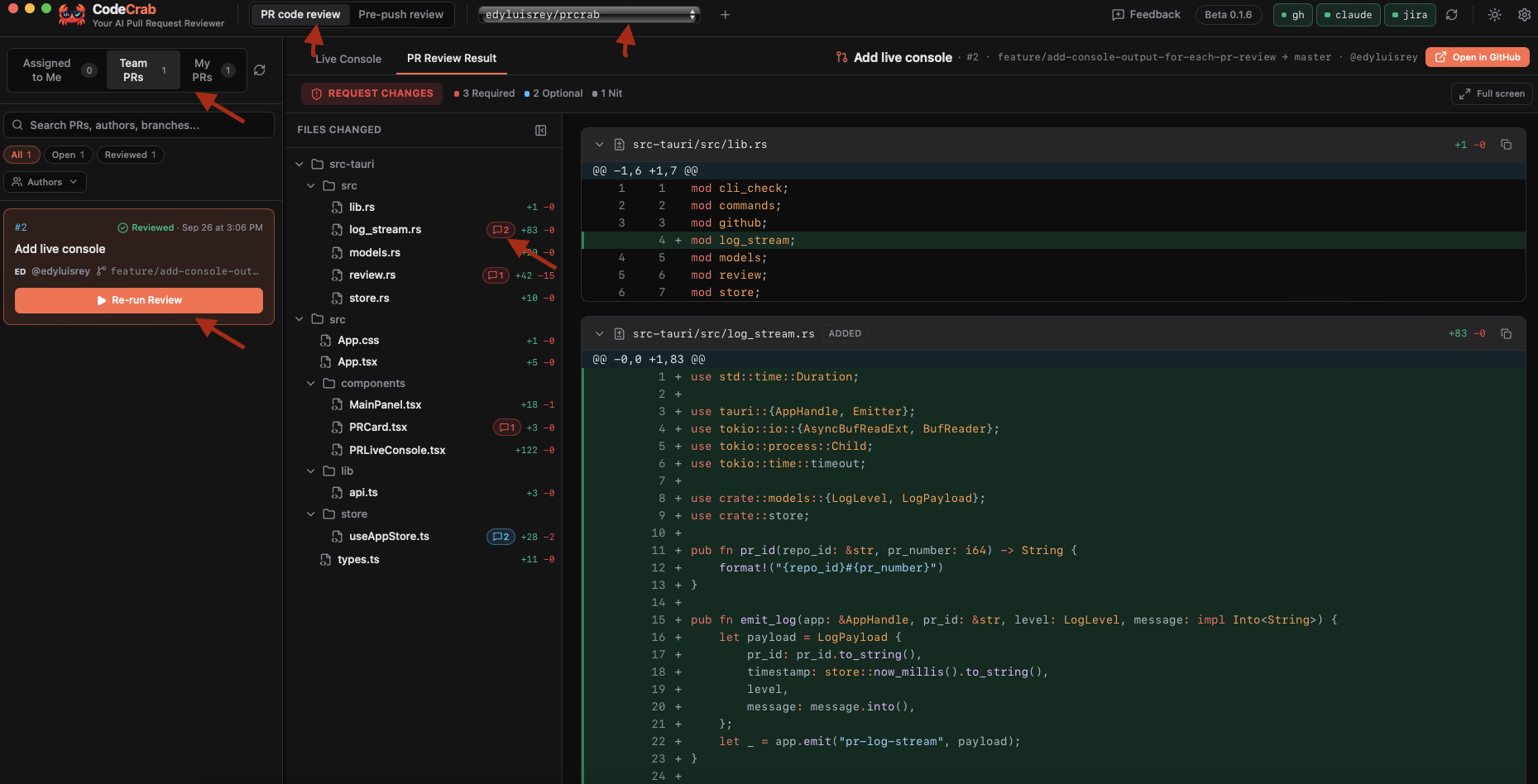
7.1 Find the PR
- • Assigned to Me: PRs where you are an assignee or requested reviewer. Start here.
- • Team PRs: every other open PR in the repo.
- • My PRs: PRs you opened.
Use search, status filters and Authors to narrow the list.
7.2 Run the review
- Open a PR and click Start Review.
- Watch progress in Live Console.
- When it finishes, open PR Review Result.
7.3 Read the result
The verdict is Ready to Approve or Request Changes. Findings appear directly on relevant diff lines; general findings appear above the diff.
| Severity | Meaning |
|---|---|
| CRITICAL | Blocks merge: security, data loss or broken behavior. |
| REQUIRED | Must fix before merge. |
| OPTIONAL | Worth considering. |
| NIT | Minor or style. |
Every finding includes the Problem, Why it matters, Suggested Fix and a paste-ready Suggested PR Comment.
7.4 Act on a finding
- • Copy PR Comment copies the ready-to-paste comment.
- • Open on GitHub opens the exact line in the Files tab.
- • Investigate Finding opens a read-only deep dive with call traces, affected files and fix steps.
- • Use Re-run Review when new commits arrive.