
My PRs — Feedback: turn vague review comments into a clear fix
Generic or unclear feedback on your Pull Request stalls you for days. CodeCrab investigates every comment with full local code context and hands you a ready-to-run fix prompt.
Getting feedback on your own Pull Request should move you forward. Too often it does the opposite: a one-line comment you cannot decode, a suggestion without a reason, a "this looks off" on a file you did not write. So you ping the reviewer, wait for a reply across time zones, and your PR sits open another day.
The My PRs view in CodeCrab is built for exactly that moment: understand each comment as fast as possible, then get to the correct fix — with your local code as the source of truth.
The problem: feedback without context
Review comments are written quickly, by someone who holds the context in their head and assumes you do too. What reaches you is often generic ("handle the error case"), ambiguous ("this should be at the service layer"), or simply about code you inherited. The cost is not the fix — it is the round trip needed before you can even start fixing.
Investigate comment: one click, full context
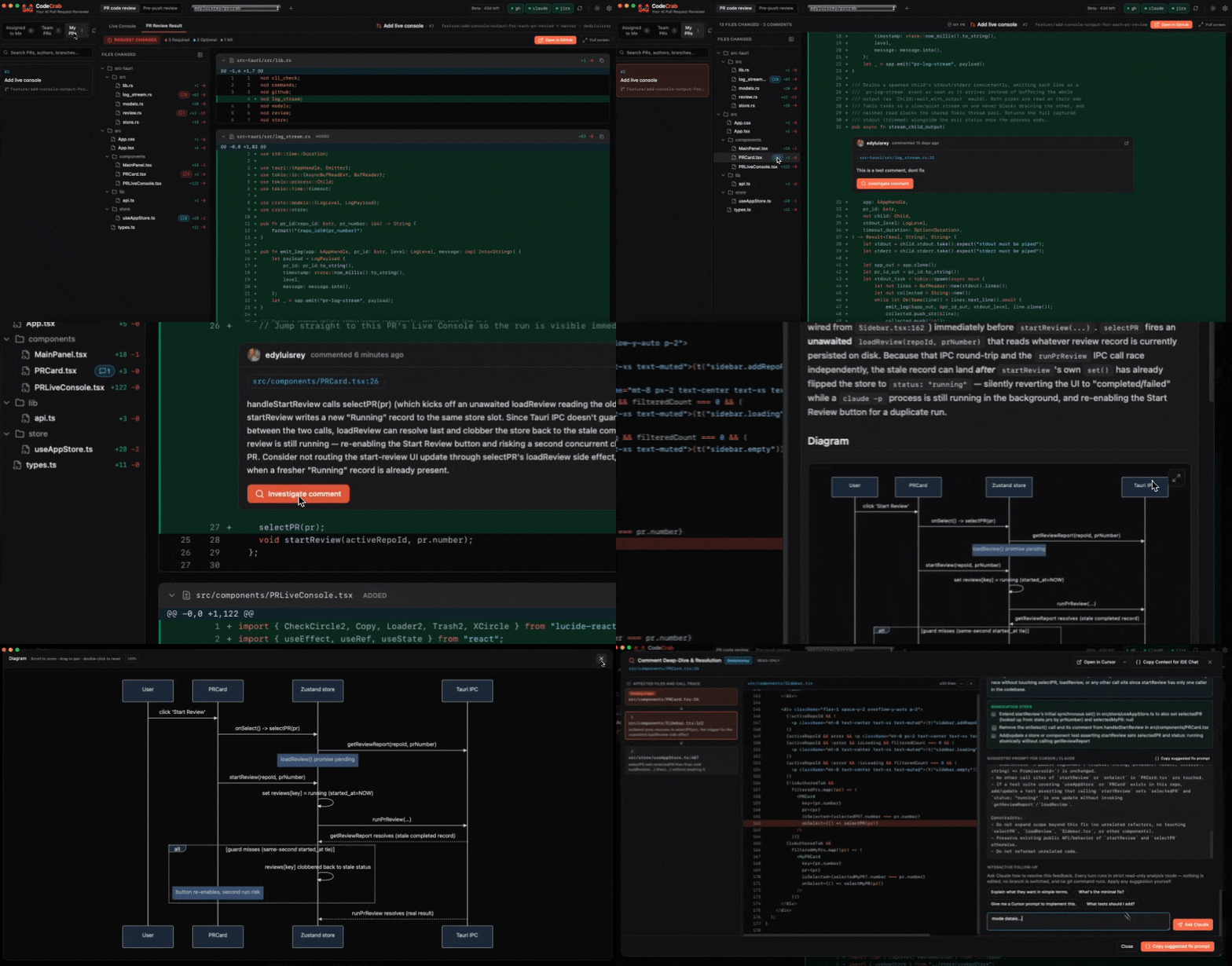
Open your Pull Request in the diff view. Every reviewer comment sits next to the line it refers to, with an Investigate comment action. Trigger it and CodeCrab opens a dedicated window with the detailed explanation: what the comment is really about, which code paths are involved, and diagrams that make the flow visible instead of hypothetical.
In the background, your local model setup — Claude Code, for example — does the digging. It has two advantages no cloud bot has:
- Your whole codebase is right there, locally, so the investigation can follow callers, tests and neighbouring modules, not just the visible diff.
- The GitHub conversation is part of the input — the comment thread, earlier replies and the surrounding review context.
From understanding to a ready-to-run fix prompt
Once the problem is clear, CodeCrab produces a fix prompt you can hand straight to Claude Code or Cursor. It is pre-filled with the relevant files, the intent of the comment and the constraints of your repository — and it is fully editable. If you disagree with the framing, rewrite it. Your criteria stay in the loop.
Read-only today, one-click fix next
Today this flow is read-only: nothing is committed, pushed or replied to without you. The next step is an opt-in automatic fix — one click, and in the background your local model creates a sub-branch, applies the change and runs your test suite on your machine.
That last part is the whole point. As a developer you already have a working test environment locally: dependencies, fixtures, services, secrets. A cloud review bot cannot run it, so it can only suggest. CodeCrab can verify. And once the fix is there, you review it yourself and approve it — the same way you would review a teammate's work.
What you gain
- No more pinging reviewers just to understand a comment.
- Explanations and diagrams grounded in your actual code, not a generic answer.
- An editable fix prompt instead of a blank cursor.
- Local verification against your real test suite.
- Full control: you decide what gets changed, published and approved.
- You learn the codebase along the way, because you see why the comment existed.
Try it on your next Pull Request
Free Public Beta — runs 100% on your machine. No code leaving your laptop.
Download CodeCrabKEEP READING
PR Code Reviews: how CodeCrab unblocks your team in the AI era
AI writes more code than ever, so review queues are the new bottleneck. Here is how CodeCrab reviews Pull Requests locally, with repo-specific skills and full engineer control.
Pre-Push Code Review: catch bugs before the Pull Request even exists
The cheapest bug is the one that never reaches a PR. CodeCrab reviews your local changes with your repo's own profile and skills, so you push higher-quality code the first time.