
03 / Required tools
Get the green checks
The top bar has three badges: gh, claude and jira.
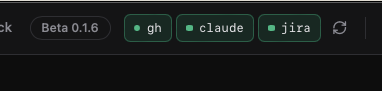
| Badge | Meaning |
|---|---|
| Green | Installed and signed in. Ready. |
| Orange | Missing or not signed in. Click it for setup steps. |
| Pulsing grey | Checking right now. |
Click an orange badge to open its setup card. Each command has a Copy button. When finished, click Re-check Status.
3.1 GitHub CLI — required
CodeCrab uses gh to list PRs, read diffs and read comments.
macOS · Terminal
# Install GitHub CLIbrew install gh
Windows · PowerShell
# Install GitHub CLIwinget install --id GitHub.cli --source winget
No Homebrew or winget? Download the installer from cli.github.com.
Terminal
# Sign in, then verify the sessiongh auth login
gh auth status
3.2 Claude Code — required
CodeCrab runs reviews through your local Claude Code, so it must be installed and signed in on this computer.
macOS · Terminal
# Install Claude Codecurl -fsSL https://claude.ai/install.sh | bash
Windows · PowerShell
# Install Claude Codeirm https://claude.ai/install.ps1 | iex
Already use Node.js? You can install it with:
Terminal
npm install -g @anthropic-ai/claude-codeRun Claude and complete the login in your browser:
Terminal
claude3.3 Jira — optional
Add Jira only if your team links tickets in PRs. It adds an Open KEY button and lets reviews use the ticket as the specification.
macOS · Terminal
# Install Atlassian CLIbrew tap atlassian/homebrew-acli
brew install acli
On Windows, follow Atlassian’s Windows guide.
Terminal
# Sign in and verify Jiraacli jira auth login --web
acli jira auth status