
04 / Repositories
Add your repositories
Each repo needs its GitHub URL and a local clone on this computer.
Terminal
# Only if you do not have a local clone yetgit clone <repo-url>
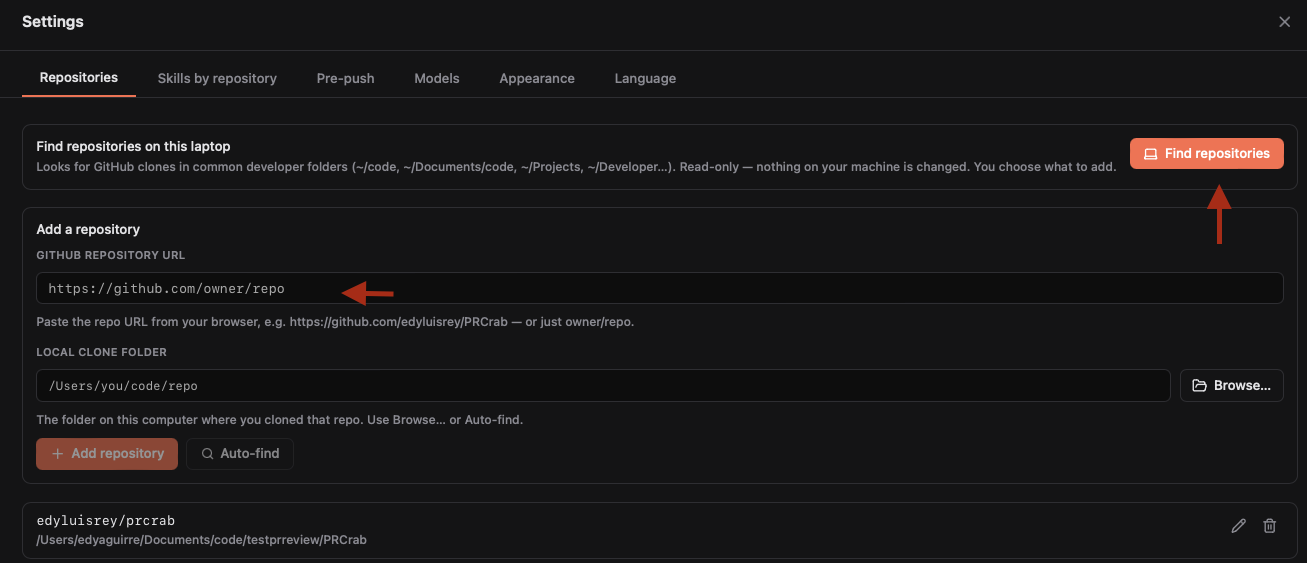
Open Settings (gear icon) → Repositories.
Fast way: let CodeCrab find them
- Click Find repositories. CodeCrab checks common folders and only reads them.
- Review the list. Recommended repos have PRs waiting for you; On GitHub means verified; Not verified appears when gh is not ready.
- Select the repos you want and click Add selected.
Manual way
- Paste the GitHub URL, such as
https://github.com/acme/web-apporacme/web-app. - Click Browse… to choose the local clone, or use Auto-find.
- Click Add repository. Use the pencil icon later to fix its local path.